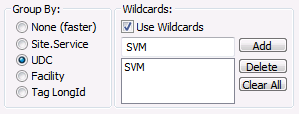
The Wildcards option is only valid when the Group By option is set to something other than None, since the grouping determines the field to which the wildcard is applied. When enabled, the wildcard feature creates custom levels of groupings above the original group.
For example, if the data is grouped by UDC, a wildcard of “SVM*” would display the contribution of all ServiceMon UDCs. Any points that do not meet a specified wildcard are listed under the grouping of “<Other>”. This provides a comparison to show how the wildcard group compares to all other points in the VHS. There is no limit to the number of wildcards that may be entered although if a single point meets multiple wildcards, it will only be listed under the first.
The accepted multi-character wildcard is “*”.
Note: In order to use a UDC or Facility wildcard, the PNT service for the selected point must be running.
To Add a Wildcard
To Delete a Wildcard
To Clear All Wildcards
|
|
|

